
Every practice session starts with a customer who doesn’t exist. Someone decided who they are, why they walked in, and how much they’ll volunteer before you ask. In EOS, that someone is partly the system and partly you, and knowing where the line sits makes practice a lot more useful.
Where your first personas come from
During onboarding, once your sources finish processing, EOS generates a first batch of personas, about six. They’re built from what you’ve given it: summaries of your ingested content (your website pages and any documents you uploaded), plus a ranked list of your core products to add variety.
That batch is generated once, at the end of first onboarding. Adding or approving products later doesn’t regenerate it. If your catalog changes a lot, the personas won’t refresh themselves. You add new ones.
What’s actually in a persona
Each persona has a name, a generated portrait, and a purpose of visit, which is the situation that brings this customer in, such as “looking to upgrade my plan.” Underneath is a set of attributes, typically five to ten, shaped to your industry. Each one has a label (budget, current plan, technical comfort), the persona’s value for it, and what the customer expects the rep to know or do about it.
There’s no fixed “goals and objections” template. Motivations and objections tend to show up inside the attributes and the purpose of visit.
What a rep sees depends on where they are. On the practice picker, each card shows the name, the portrait, and the purpose of visit. The full profile, with every attribute and expectation, lives on the persona’s detail page, which anyone on the team can open. During the session itself, the sidebar shows only the persona’s name and demeanor. The simulated customer works from the full brief behind the scenes.
Adding your own
There are two ways to add personas:
- Create training materials with personas selected. This generates a new batch and adds it alongside the existing ones.
- Create persona. An admin describes a purpose of visit in plain text, and EOS generates one new persona in the background.
Neither replaces or deletes anything already there. Personas are organization-wide training profiles, and only org admins and owners can create, edit, or delete them. There’s no fixed cap on how many personas an organization can have.
Personas aren’t tied to specific products. They reflect your overall catalog and the visit purpose you define, and you can’t limit a persona to one product. There’s also no assignment step: reps choose which persona to practice with themselves.
See what the verification behind practice actually checks. Our 12-page report, Beyond Roleplay: The Rise of the Sales Knowledge Engine, covers claim extraction, fact-grounded verification, and the questions worth asking any vendor about how roleplay is evaluated. [Download the whitepaper →]
Demeanor: how much the customer volunteers
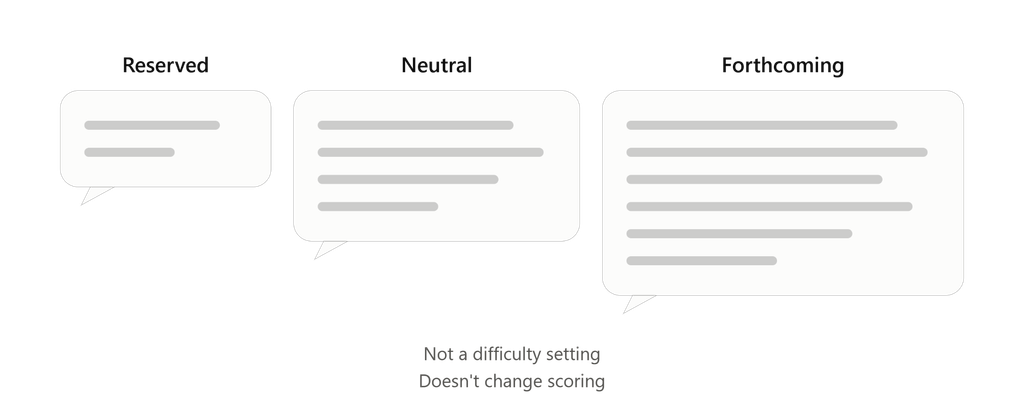
Before a practice session starts, the rep picks one of three demeanors: Reserved, Neutral, or Forthcoming. Demeanor controls how much the simulated customer offers before being asked, such as budget, concerns, and background, and how many questions or objections they raise per turn. It also scales how long each turn runs. Reserved is the shortest, Neutral is a step longer, and Forthcoming is the most talkative.
It isn’t a difficulty slider. In all three settings the customer holds back from committing until their concerns are addressed. And it doesn’t touch scoring: demeanor shapes how the customer behaves in the roleplay, not how the session is evaluated.
The rep chooses demeanor once, on the practice screen where they pick a persona, and the default is Reserved. Onboarding is the exception. During the first demo you choose which persona to practice with, but not the demeanor, and that session uses a more forthcoming customer by default.
Sales context is set for the whole organization
The simulated customer also behaves according to a sales context: walk-in, inbound inquiry, scheduled meeting, or generic. It’s detected automatically from your content during onboarding, and admins can change it in organization settings. Reps don’t choose it per session. It shapes how the customer opens the conversation, for example walking into a store versus arriving at a booked call. Because it’s one setting per organization, a team that does both walk-in and scheduled sales gets one context, not two.
Two things to know before you trust a practice score
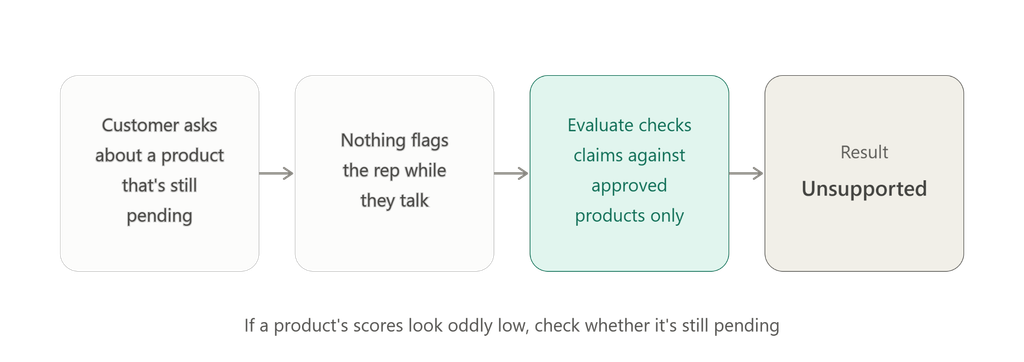
Personas can ask about products that aren’t approved yet. Because personas are generated from your broader catalog, a simulated customer may ask about a product that’s still pending in Knowledge Hub. Nothing flags the rep mid-conversation. After someone runs Evaluate, the rep’s claims are checked against approved products only, so a claim about a pending product tends to come back Unsupported. If scores on one product look oddly low, check whether it’s still waiting for approval.
AI Coaching is optional and doesn’t change the score. During voice practice, a rep can switch on a coaching panel with hints, customer-insight tags, and suggested product specs. It’s off by default (the onboarding demo turns it on automatically). It’s an aid for the rep, not verification, and it exists only in practice. It has nothing to do with real sales calls, where no live coaching happens. It doesn’t appear on the session report, and it doesn’t change how the session is scored. If a rep reads a suggested spec out loud, those words become claims in the transcript and are checked like any other statement. So a high product-knowledge score means what the rep said matched approved product knowledge. It doesn’t prove they worked without help.
What a manager sees
For practice sessions, the session list and the session report both show which persona and which demeanor the rep used. Uploaded real calls don’t have either, since no simulated customer was involved. Scoring still happens after someone runs Evaluate on the session.
Persona and demeanor work the same whether the rep speaks or types, and the conversation runs in your organization’s training language.
The takeaway
Practice is only as realistic as the customer in it. Three decisions shape that: which persona and demeanor a rep chooses, whether your catalog has been approved so the persona’s questions can be checked, and whether your persona set keeps up with what you actually sell. The first belongs to the rep. The other two belong to whoever runs the organization.
See your own docs become a knowledge check. EOS turns your product documentation into practice and provable knowledge — claim extraction, fact-grounded verification, and auto-generated quizzes that reveal what reps actually know. Start free with up to 5 seats at app.akaeos.com, or [download the full whitepaper].

Leave a Reply